
You do not need an account, a website integration, or a list of prompts to check a site’s AI visibility. Install the free extension from the Chrome Web Store, open any public website, and press “Measure this site” in the side panel. This guide walks through each step, then explains how to read the two scores and use the Competition, Questions, and Sources tabs for research.
What does “AI visibility” mean here?
AI visibility describes whether a site appears when an AI assistant answers a question, not whether it ranks on a search results page. Someone might ask an AI system for “the best project management tool” or “alternatives to X” without naming any company. Some sites get cited in the answer; most stay invisible. The extension measures that gap for any domain you’re browsing.
This is already a question people search for on their own. In Google autocomplete on September 29, 2026 (US, English), “ai visibility score” returned on-topic suggestions in all 10 slots, including “free”, “checker”, and “semrush” — checking AI visibility isn’t a niche idea.
What you need
- Google Chrome
- The free extension, installed from the Chrome Web Store
- Any public website open in a tab
No account, sign-up, or website integration is required. You don’t need to own the site you’re checking, either — the same steps work on your own product, a competitor’s, or any brand you’re researching.
Step-by-step: check a site’s AI visibility
- Install the extension from the Chrome Web Store.
- Open any public website — your own, a competitor’s, or one you’re just curious about.
- Click the toolbar icon. The side panel opens for the current tab. If you don’t see the icon, pin it from Chrome’s extensions menu so it’s always one click away.
- Press “Measure this site.” Nothing is sent before you click it.
- Read the result. A site that’s already been measured returns its AI score, Brand score, and measurement date within about a second. A site nobody has measured yet takes up to a minute: a progress bar runs while AI engines are queried, then the result appears in the same panel — and stays available to the next person who checks that domain, until it’s re-measured automatically after 7 days.
You can leave the panel open while you browse elsewhere, or close it and reopen it later — the result for a site you’ve already measured is kept, so you’re not re-running the same measurement every time you revisit a tab.
How to read the AI score and Brand score
Two scores appear after a measurement, both on a 0-100 scale. The AI score summarizes a domain’s visibility in answers to discovery questions that do not name the brand — the kind of question that starts from a need or a category rather than a company name. The Brand score summarizes visibility in answers to questions that explicitly name the brand. A higher score means greater measured visibility within the questions and conditions covered, and the two scores describe different situations that are worth reading separately.
Read them alongside the measurement date the panel shows — a result reflects the available measurement, not a live view of every AI answer. The full explanation, including how much weight a single score can carry, is on the Method page.
The two scores are worth reading side by side rather than as one number. A site with a high Brand score and a low AI score is recognized once someone already knows its name, but easy to miss when a question starts from a need or a category instead. A high AI score with a low Brand score points the other way: the site gets pulled into discovery answers, but hasn’t built the same name recognition yet. Neither pattern is inherently good or bad — it’s a starting point for deciding what to look at next.
Who checks AI visibility, and why
The steps above are the same whoever is using them, but the reason varies:
- A founder wants to know if their own product shows up when someone describes the problem it solves, before they’ve ever heard the product’s name.
- A developer or marketer wants to check a specific page or campaign’s effect on how an AI assistant describes the company, without waiting for a dashboard.
- An SEO or GEO specialist wants to compare a client’s domain against named competitors in the Competition tab, using the same discovery questions across all of them.
In every case, the workflow is: open the site, measure it, and read the scores next to the Competition, Questions, and Sources tabs — not a separate report to request or a login to remember.
Using Competition, Questions, and Sources for research
Below the scores, three tabs show the data behind the measurement. The screenshots here are from a real, stored measurement of github.com, captured on September 28, 2026 — a dated snapshot, not an endorsement of the site.
Competition
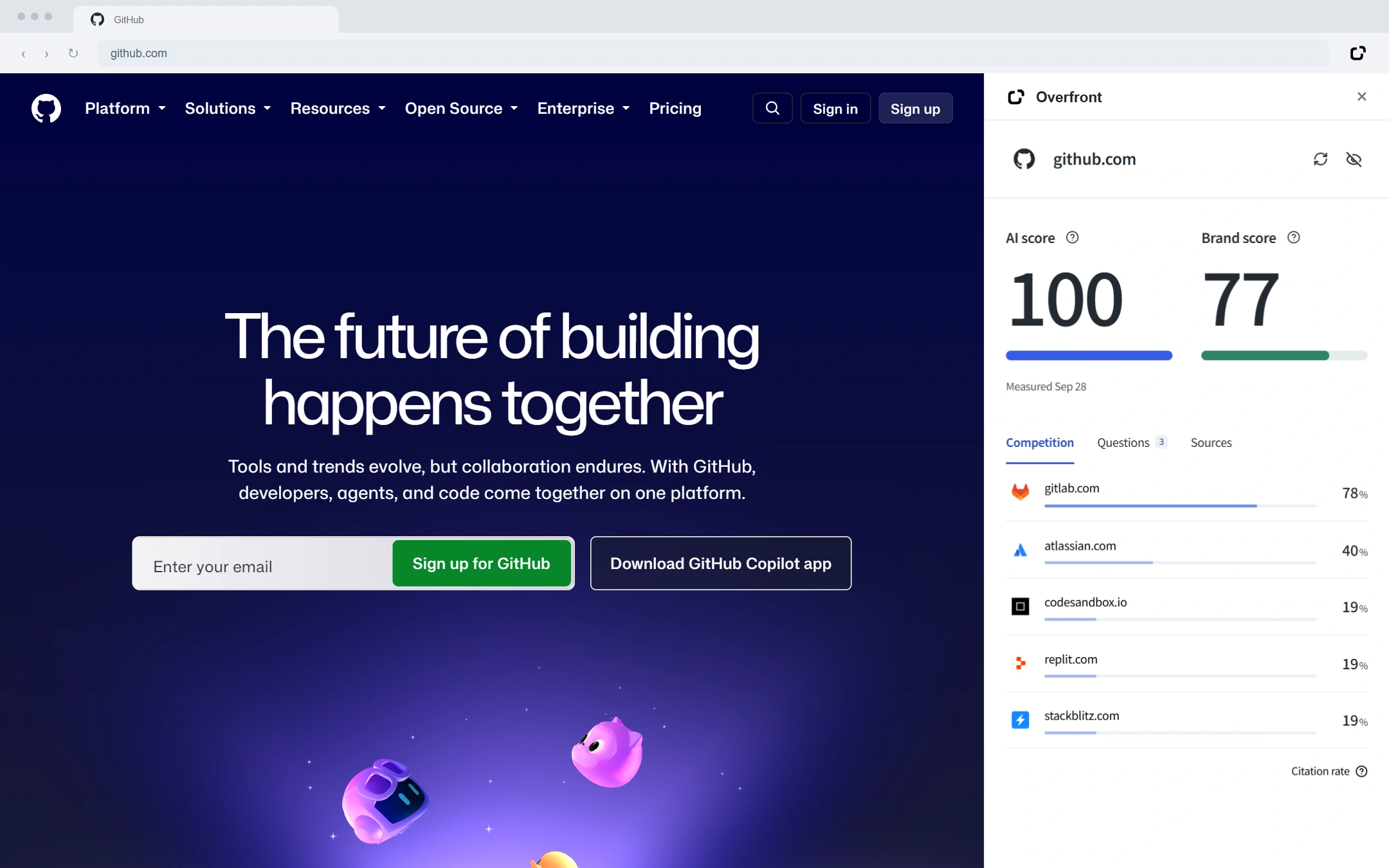
The Competition tab lists other sites that appear in the same AI answers, with citation rates side by side. For github.com, that includes other developer tools discussed alongside it, such as codesandbox.io and stackblitz.com. It’s the fastest way to see who else is winning the same AI answers you care about.
Questions
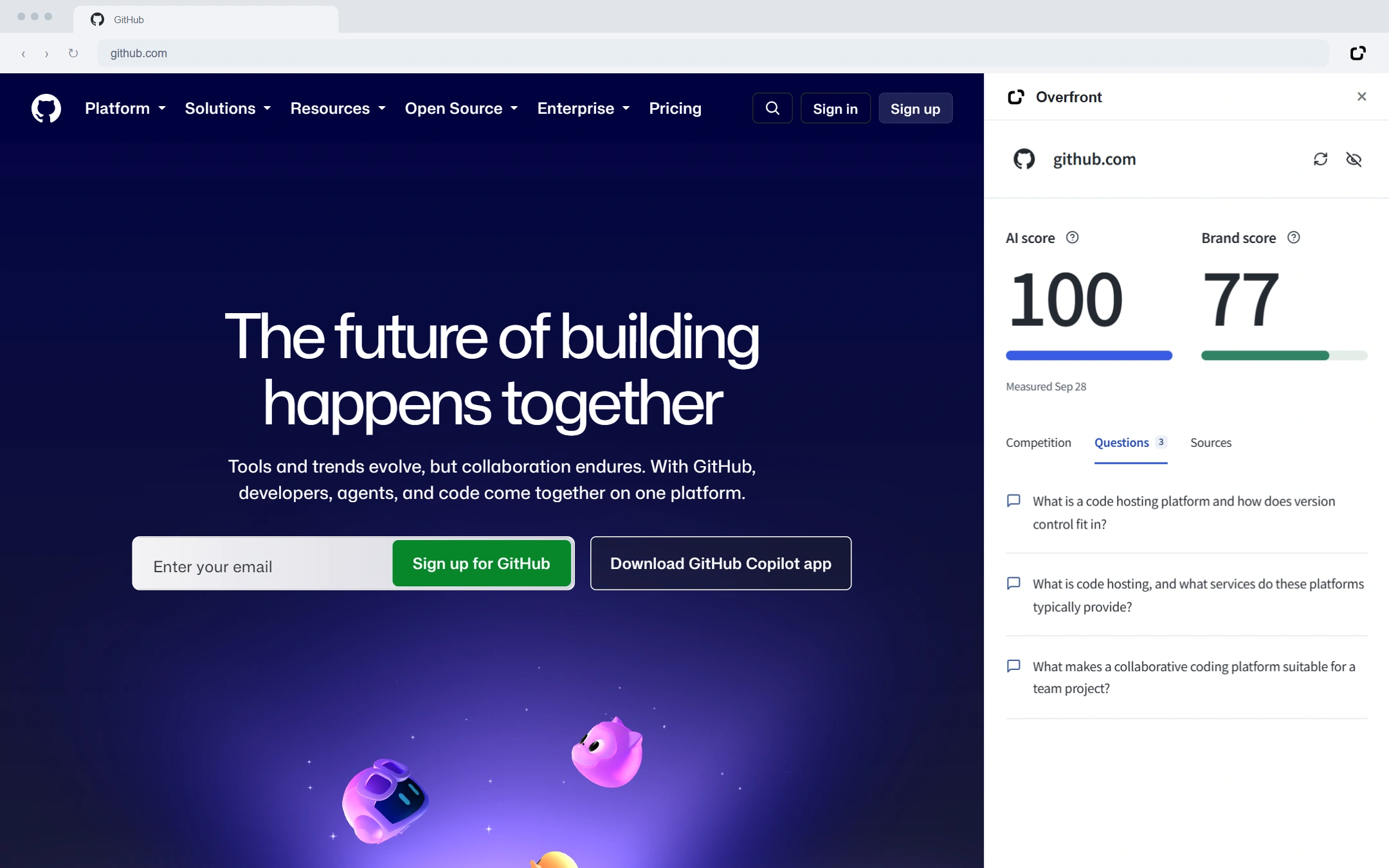
The Questions tab shows the actual discovery questions asked during the measurement, so a score is never just a number — you can see exactly what produced it, and judge for yourself whether those questions match the audience you’re trying to reach.
Sources
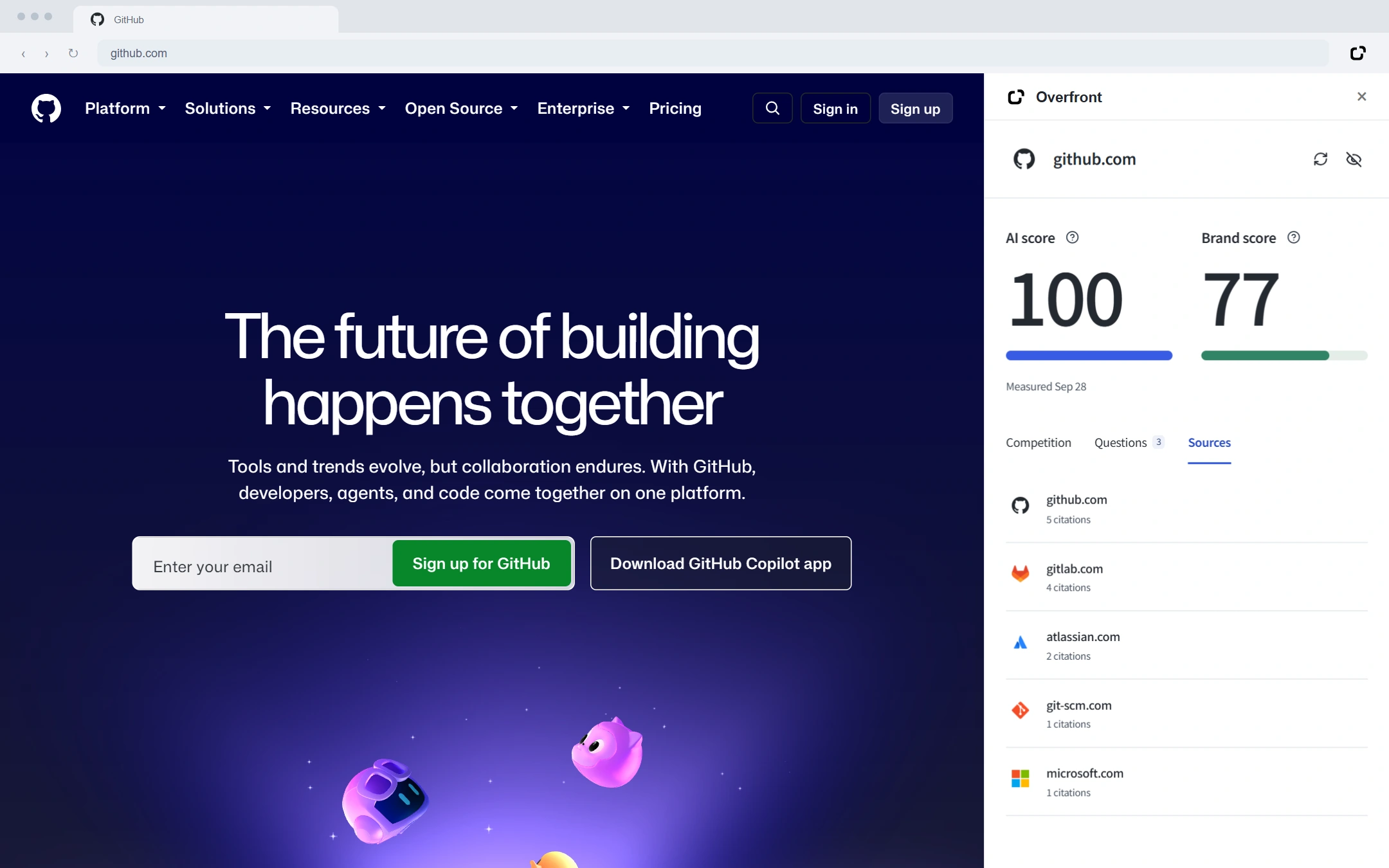
The Sources tab shows domains the AI’s answers cited across the measured questions. A citation shows a source appeared in an answer; it doesn’t explain why the engine picked it, so treat this as a reading list rather than a formula.
How to check a competitor’s AI visibility
The steps are the same: open the competitor’s site, click the toolbar icon, and press “Measure this site.” If someone has already measured that domain, you’ll have their AI score, Brand score, and the Competition, Questions, and Sources tabs within a second. Because results are shared across everyone who checks a domain and refreshed automatically after 7 days, checking back periodically is enough to track how a competitor’s visibility changes, without running your own repeated measurements.
For a persistent view while you browse, turn on the optional on-page badge (the eye icon in the panel). It shows a site’s AI score in the corner of the page as you browse, asks for website access only once you turn it on, and can be switched off at any time.
What the extension does not do
It’s worth being clear about the edges of what a measurement covers, so a score doesn’t get read as more than it is:
- It doesn’t read your personal ChatGPT conversations or account memory. Measurements do not use your chat history, so nothing you’ve typed into an AI assistant yourself feeds into a score.
- It doesn’t guarantee a citation, a ranking, or traffic. Scores are estimates, not official rankings, and a low result doesn’t prove a site never appears.
- Current coverage is OpenAI API responses with web search. It doesn’t yet measure Google AI Overviews or other AI providers, so treat a result as one well-defined window rather than the whole AI search landscape.
- Because of personalization, wording, and settings, results can differ from what you’d see asking the same question in your own ChatGPT session.
- It doesn’t send URLs, page content, or browsing history — only the registrable domain and an anonymous identifier, and only when you interact with it.
FAQ
Is this free?
Yes. The extension is free, with no account or sign-up required to check a site’s AI visibility.
Do I need to add anything to my website first?
No. Open the public site in a tab and the extension reads its domain; there’s no script to install and no verification step.
What happens to my browsing data?
Only the site’s registrable domain and an anonymous identifier are sent, and only after you press “Measure this site.” No URLs, page content, or browsing history are transmitted.
Why does a new site take longer than an already-measured one?
An already-measured site returns a stored result almost immediately. A site nobody has checked yet needs a fresh measurement, which queries AI engines and can take up to a minute; after that, the result is available to everyone else who checks that domain too.
Will my own ChatGPT conversation match the score?
Not necessarily. The AI score reflects OpenAI API responses with web search, sampled independently of any one person’s account, so it can differ from a personal chat shaped by your own history and settings.